
You’re using your phone normally — maybe scrolling Instagram, watching YouTube, or on a call — and suddenly the signal drops. Calls start breaking, internet slows down, and sometimes there’s no network at all.
Frustrating, right?
If you’ve been wondering, “Why is my phone signal weak all of a sudden?”, you’re not alone. I’ve personally seen this happen many times, especially while traveling or even inside rooms at home.
The good thing is — in most cases, it’s not a serious problem. And yes, you can fix it without being a tech expert.
Let’s understand what’s actually going wrong.
📡 Common Reasons for Weak Phone Signal
📍 1. You’re in a Low Network Area
This is the most common reason.
If you’re inside a building, basement, lift, or even a room far from windows, your phone struggles to catch signals from nearby towers.
I’ve noticed this a lot — even in good network areas, one corner of the house can have poor signal.
✔ What you can do:
Try moving near a window or stepping outside for a moment.
You can also turn Airplane mode ON and OFF — this forces your phone to reconnect.
📶 2. Too Many People Using the Same Network
Sometimes your signal is not actually “weak” — it’s just overloaded.
This usually happens in:
-
Crowded places
-
Events
-
Evenings when everyone is online
Even if you see signal bars, internet may still feel slow.
✔ Simple fix:
Wait for some time or switch between 4G and 5G in your settings.
In many cases, 4G actually works better than 5G right now.
📲 3. SIM Card Problem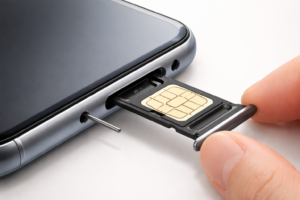
This is something many people ignore.
A slightly damaged or loose SIM card can cause:
-
Network drops
-
Weak signal
-
No service sometimes
✔ Try this:
Remove your SIM card and insert it again properly.
If possible, test it in another phone.
If the problem continues, getting a new SIM is usually the easiest fix.
⚙️ 4. Small Software Glitch
Phones are not perfect. Sometimes after an update or even randomly, small bugs can affect network performance.
I’ve seen phones suddenly start losing signal after a software update.
✔ What helps:
-
Restart your phone
-
Check for updates
-
Reset network settings
This fixes the issue in most cases.
📦 5. Your Phone Case Might Be the Problem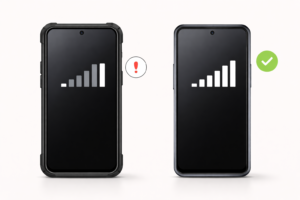
Sounds strange, but it’s true.
Some thick or metal phone covers can slightly block signal reception.
✔ Quick check:
Remove your phone case and see if signal improves.
🔋 6. Old Phone or Hardware Issue
If your phone is a few years old or has been dropped before, the internal antenna might not work properly.
This can lead to constant weak signal.
✔ What to do:
If nothing else works, it’s better to get it checked at a service center.
🌐 7. Wrong Network Settings
Sometimes the issue is just incorrect settings.
Your phone might not be selecting the best available network.
✔ Fix:
Go to settings and:
-
Set network selection to automatic
-
Reset APN settings
-
Reset network settings
🔧 Simple Ways to Fix Weak Signal (Try These First)
If your signal suddenly becomes weak, try these quick fixes:
-
Restart your phone (works more often than you think)
-
Turn Airplane mode ON → OFF
-
Switch between 4G and 5G
-
Reinsert SIM card
-
Reset network settings
In my experience, one of these usually solves the problem.
🏠 Why Signal Is Weak at Home
This is a very common complaint.
You might get full signal outside, but inside your house — especially in certain rooms — it drops.
This happens because walls and buildings block signals.
✔ What you can do:
-
Sit near windows
-
Avoid using phone in corners or closed rooms
-
Use WiFi calling if available
One more thing I’ve noticed — sometimes just changing your sitting spot improves signal a lot.
🚗 Why Signal Drops While Traveling
If your network disappears while driving or in a train, don’t worry.
This is completely normal.
Your phone keeps switching between different towers, and during that time, signal may drop for a few seconds.
There’s not much to fix here — it usually stabilizes on its own.
❓ FAQs (Real Questions People Ask)
Q1. Why is my phone signal suddenly so bad?
Most of the time, it’s due to location, network congestion, or a small SIM/phone issue.
Q2. How can I make my phone signal stronger?
Try moving to an open area, restarting your phone, or switching network type.
Q3. Is it my phone or SIM causing the issue?
The easiest way to check is by putting your SIM in another phone.
Q4. Why do I have full signal but slow internet?
That’s usually because of network congestion, not signal strength.
Q5. Does 5G cause signal problems?
Sometimes yes. In many areas, 4G is still more stable than 5G.
🔗 You May Also Like
-
How to Fix Mobile Data Not Working
-
Why Internet Stops While Driving
-
Best Budget Phones with Strong Network
🏁 Conclusion
Weak phone signal can be really annoying, especially when it happens suddenly. But the truth is, in most cases, the problem is simple — like network coverage, SIM issues, or small software glitches.
You don’t need any technical knowledge to fix it.
Just try the basic steps like restarting your phone, checking your SIM, or adjusting settings — and your signal should be back to normal.
And if nothing works, then yes, it might be time to get your phone checked.