
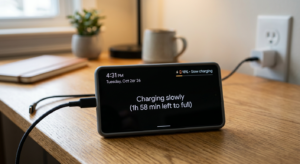
 If you’ve recently noticed that your phone is charging slowly, you’re definitely not the only one. Many Android users search for things like “why is my phone charging slowly” or “slow charging problem Android” when their phone suddenly starts taking much longer to charge.
Sometimes a phone that used to charge quickly starts taking twice the normal time, and it can be frustrating. The good thing is that in most cases the problem isn’t serious and can be fixed easily.
In this guide, we’ll look at why your phone is charging slowly, what causes the problem, and some simple fixes you can try right away.
Common Reasons Your Phone Is Charging Slowly
1. Damaged or Low-Quality Charging Cable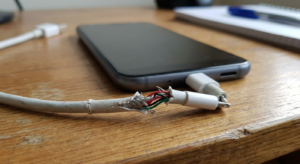
One of the most common reasons for phone charging slowly on Android is a bad charging cable.
Charging cables go through a lot of use. After months or years, the internal wires can become weak or damaged, especially if the cable is bent often.
Easy Fix
-
Try charging with a different cable
-
Use the original cable if possible
-
Avoid very cheap third-party cables
Sometimes simply changing the cable fixes the slow charging problem instantly.
2. Weak or Old Charging Adapter
Another reason your phone may be charging slowly is the charger adapter itself.
Some adapters don’t provide enough power, especially older ones. If the charger isn’t powerful enough, your phone will charge much slower.
Easy Fix
-
Use the original charger that came with the phone
-
Make sure the charger supports fast charging
3. Dust Inside the Charging Port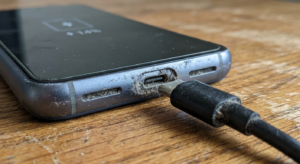
Many people don’t realize this, but dust in the charging port is a very common reason why your phone is charging slowly all of a sudden.
Over time, pocket dust or dirt can collect inside the port and block the connection.
Easy Fix
-
Turn off your phone
-
Use a soft brush or wooden toothpick
-
Gently remove dust from the charging port
Avoid using metal objects because they can damage the port.
4. Using the Phone While Charging
If you are watching videos, gaming, or scrolling social media while charging, the battery is being used and charged at the same time.
Because of this, it may look like your phone is taking too long to charge.
Easy Fix
Try to avoid heavy use while charging and let the phone charge normally.
5. Too Many Apps Running in the Background
Sometimes the issue isn’t the charger — it’s the apps running in the background.
Too many background apps can consume power and slow down the charging speed.
Easy Fix
-
Close unnecessary apps
-
Restart your phone
-
Check battery usage in settings
6. Phone Temperature Is Too High
If your phone gets too hot, the system automatically slows down charging to protect the battery.
This often happens when:
-
Charging in a hot environment
-
Playing games while charging
-
Using the phone heavily during charging
Easy Fix
-
Remove the phone case
-
Keep the phone in a cool place
-
Avoid heavy use while charging
7. Software Glitches
Sometimes a software bug can also cause a slow charging problem on Android.
This can happen after system updates or when the phone hasn’t been restarted for a long time.
Easy Fix
-
Restart your phone
-
Install the latest software update
8. Fast Charging Is Turned Off
Some Android phones allow you to enable or disable fast charging in settings. If it is disabled, your phone will charge slowly.
Easy Fix
Go to:
Settings → Battery → Charging Settings
Then enable Fast Charging.
9. Damaged Charging Port
If the charging port is loose or worn out, your phone may charge very slowly when plugged in.
This can happen if the cable doesn’t fit tightly anymore.
Easy Fix
If cleaning the port doesn’t help, it’s better to visit a mobile repair shop and get the port checked.
10. Battery Health Is Getting Weak
If your phone is 2–3 years old, the battery may simply be aging.
Older batteries lose efficiency and cannot charge as quickly as they did when new.
Easy Fix
Replacing the battery can restore normal charging speed.
How to Fix Slow Charging on Android Quickly
If your Android phone is charging slowly, try these simple steps first:
-
Use the original charger and cable
-
Clean the charging port
-
Close background apps
-
Avoid using the phone while charging
-
Restart the device
-
Enable fast charging
In many cases, these small steps solve the problem.
When Should You Replace the Charger or Battery?
You should consider replacing something if:
-
The charging cable is damaged
-
The adapter is very old
-
The charging port feels loose
-
The battery drains quickly and charges slowly
A technician can quickly identify the problem and fix it.
FAQs
Why is my phone charging slowly all of a sudden?
This usually happens because of dust in the charging port, background apps, overheating, or a damaged charging cable.
Why is my phone charging slowly when plugged in?
Your phone may charge slowly if the charger is weak, the cable is damaged, or the charging port is dirty.
How can I fix slow charging on Android?
Use the original charger, clean the charging port, close background apps, and avoid using the phone while charging.
Why is fast charging not working?
Fast charging may stop working if:
-
The charger does not support fast charging
-
The cable is damaged
-
Fast charging is turned off in settings
Final Thoughts
If you’re wondering why your phone is charging slowly, the reason is usually something simple like a damaged cable, dust in the charging port, background apps, or an aging battery.
The good news is that most slow charging problems on Android can be fixed with a few quick checks.
Before replacing your phone, try the simple solutions above — you might fix the problem in just a few minuts
Related Smartphone Problems
Sometimes slow charging is not the only issue users face. Many Android users also experience problems like phone heating while charging or battery draining overnight. These issues can be connected to charging problems, background apps, or battery health.
If you are facing these problems too, you may find these guides helpful:
These articles explain the common reasons behind these issues and simple steps you can try to fix them.