
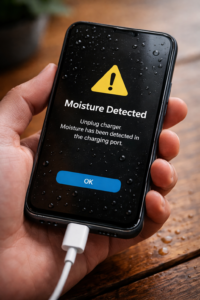
 So, your phone got wet… and now it won’t charge?
I’ve actually faced this myself.
A few months ago, I accidentally spilled water on my phone. It was working fine at first, but when I plugged in the charger—nothing. No charging sign, just silence. For a moment, I thought the phone was gone.
If you’re dealing with the same problem—don’t panic.
👉 In most cases, when a phone is not charging after water damage, it’s not completely dead. It just needs the right steps.
Let’s understand what’s happening and how you can fix it.
Why is my phone not charging after water damage?
When water enters your phone, it mainly affects the charging port and internal connections.
Here’s what usually happens:
1. Moisture detected = charging blocked
Most modern phones are smart enough to protect themselves.
If there’s moisture in the charging port, the phone automatically stops charging to avoid damage.
That’s when you see:
- “Moisture detected” warning
- Charging disabled message
👉 This is actually a safety feature, not a fault.
2. Water stuck inside the charging port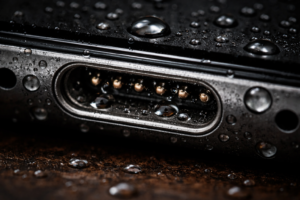
Even a tiny drop inside the port can stop proper connection.
I’ve seen this happen—my cable was perfectly fine, but the phone just wouldn’t detect it.
👉 Result:
- Charger not connecting
- Charging starts and stops
- Loose connection feeling
3. Hidden corrosion (slow damage)
This is something people ignore.
Water leaves behind minerals, and over time, it can create corrosion inside the charging port.
👉 This can lead to:
- Charging issues after a few days
- Slow charging
- Permanent damage if ignored
4. Short circuit (worst case)
If you tried charging immediately after the phone got wet, it can cause internal damage.
👉 That’s when things get serious and may need repair.
First things you should do (don’t skip this)
Right after your phone gets wet:
- Turn it OFF immediately
- Do NOT plug in the charger
- Remove SIM tray if possible
- Keep it in a dry place
I know the first instinct is to check if it’s working—but charging too soon can make things worse.
How to fix phone not charging after water damage
Now let’s come to the part you actually need—real fixes.
1. Let the charging port dry properly
This sounds basic, but it works in most cases.
👉 What I did:
I left my phone near a fan overnight. No heat, just airflow.
What you should do: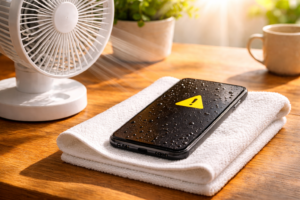
- Keep phone in open air
- Use a fan (not heat)
- Leave it for at least 8–12 hours
👉 Don’t rush this step.
2. Skip rice, use silica gel if possible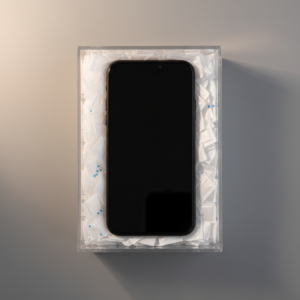
You’ve probably heard: “Put your phone in rice.”
Honestly, I tried it once. It helped a bit, but not fully.
👉 A better option:
Use silica gel packets (those small packets in shoe boxes).
- Put phone in a closed box
- Add silica gel
- Leave it for 24 hours
This absorbs moisture much better.
3. Clean the charging port (carefully)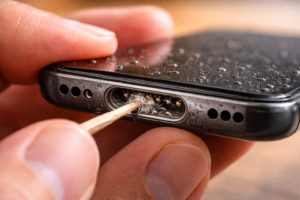
Sometimes the issue is not just water—it’s dirt + moisture together.
👉 Simple trick:
- Use a wooden toothpick
- Gently clean inside the port
- Don’t use anything metal
I’ve fixed a slow charging issue just by cleaning dust from the port.
4. Fix “moisture detected” error
If your phone keeps showing this warning even when it looks dry:
Try this:
- Turn off the phone
- Keep it in a dry place for a few hours
- Restart it
Sometimes the sensor just needs time to reset.
5. Try a different charger
This might sound simple, but it works surprisingly often.
👉 Test with:
- Another cable
- Another adapter
After water exposure, charging detection can act weird.
6. Use wireless charging (if available)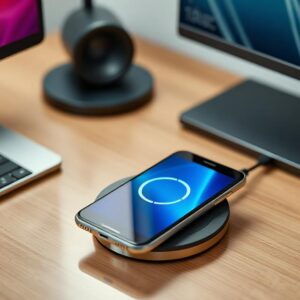
If your phone supports it:
👉 Use wireless charging temporarily
This helps you:
- Charge safely
- Avoid using the wet charging port
7. Give it proper time (this is where most people fail)
Most people try charging too early.
👉 Reality:
Even if your phone looks dry outside, inside moisture can still be present.
- Minimum wait → 12 hours
- Safe wait → 24 hours
This alone fixes many wet phone not charging fix cases.
What NOT to do (seriously avoid this)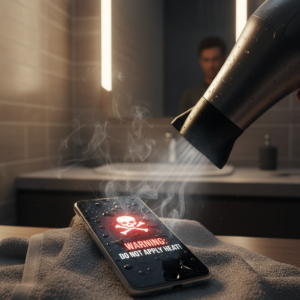
I’ve seen people damage their phones more by doing these:
❌ Using a hair dryer
❌ Charging immediately after water exposure
❌ Shaking phone aggressively
❌ Inserting metal pins in port
👉 These can make a small issue much worse.
Can water damage stop charging permanently?
Yes—but not always.
If the damage is limited to moisture, you can fix it.
But if there’s:
- Corrosion
- Internal short circuit
Then the phone may:
- Not charge at all
- Charge very slowly
- Heat while charging
When you should visit a technician
If nothing works after trying all fixes:
Go for repair if:
- Phone still not charging after 1–2 days
- Charging works only when cable is bent
- Phone heats while charging
👉 Most likely issue:
- Damaged charging port
- Battery problem
- Internal circuit issue
Why phone charges slowly after water damage?
This is very common.
Even after fixing, you may notice slow charging.
👉 Reason:
- Weak connection in charging port
- Slight moisture still present
- Internal resistance increased
👉 Solution:
- Clean port again
- Use original charger
- Give it more drying time
Final thoughts (important)
If your phone is not charging after water damage, don’t assume it’s dead.
In my case, I thought I had lost my phone—but after letting it dry properly and cleaning the port, it started charging normally again.
👉 The key is simple:
- Don’t panic
- Don’t rush
- Let it dry properly
Most of the time, the issue is temporary and fixable.
FAQs
Why is my phone not charging after getting wet?
Because moisture in the charging port blocks charging or triggers safety protection.
Can I fix water damaged charging port at home?
Yes, if the damage is minor and you dry and clean it properly.
Should I charge my phone after it gets wet?
No. Wait at least 12–24 hours before charging.
Does rice really fix water-damaged phones?
It helps a little, but silica gel works better.
Can water permanently damage charging port?
Yes, if corrosion or short circuit happens.
Related Articles You Should Also Read
If your phone is not charging after water damage, there could be other related issues affecting its performance. You can check these helpful guides to fix similar problems:
- If your device is getting hot while charging, read our guide on Phone Heating While Charging – Causes & Fixes
- Facing slow charging even after fixing the issue? Check Mobile Charging Slow Even with Fast Charger? Fix It
- Seeing a warning like moisture detected? Here’s how to fix it: Moisture Detected Error – Easy Solution Guide
- If your charging port is not working properly, read Charging Port Not Working – How to Fix It
- Battery draining faster than usual? Don’t miss Why Your Phone Battery Drains Fast & How to Fix It
These guides will help you solve related problems and keep your phone working properly.