
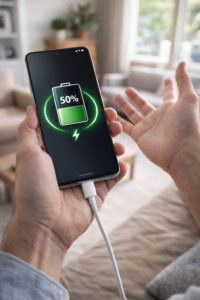
 Have you ever plugged in your phone, seen the charging icon ⚡… but the battery percentage just doesn’t move?
Sometimes it stays stuck at 20%, 50%, or even 80% for a long time. In some cases, it even drops while charging.
If your phone is charging but battery not increasing, don’t worry — this is a very common issue, especially in Android phones.
👉 Honestly, I’ve seen this happen many times, especially on phones that are 1–2 years old. Most people think their battery is dead, but that’s not always true.
In this guide, we’ll explain real reasons + practical fixes in simple language.
🔍 What Does “Charging but Not Increasing” Mean?
This problem means:
- Your phone detects the charger (charging symbol shows)
- But battery percentage is not increasing
- Or increasing very slowly
- Or even decreasing while plugged in
👉 In simple words, power is coming in, but not enough to actually charge the battery.
⚠️ Main Reasons Why Battery Percentage Is Not Increasing
Let’s understand the real causes 👇
🔌 1. Weak Charger or Cable (Most Common)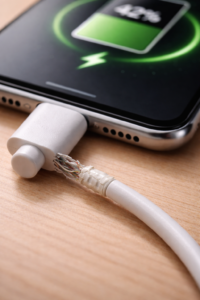
If you’re using:
- Cheap charger
- Damaged cable
- Low power adapter
👉 Your phone gets very low power, which is not enough to charge properly.
So even though it shows charging, the battery doesn’t increase.
💡 From experience: Many users ignore this and keep blaming the phone, but in reality, the issue is often just a faulty cable.
🔥 2. Phone Heating While Charging
When your phone gets hot:
- Charging slows down automatically
- Sometimes stops increasing battery
👉 This is a safety feature to protect the battery.
💡 I’ve personally noticed this while charging in summer or while using the phone during charging — the percentage just freezes.
📱 3. Background Apps Using Battery
If heavy apps are running:
- Gaming
- YouTube
👉 They consume battery faster than charging speed.
Result:
➡️ Battery stuck or not increasing
💡 This is very common — especially when people charge their phone while watching videos.
🔋 4. Battery Health is Weak (Important)
If your phone is old (2–3 years):
- Battery capacity reduces
- Charging becomes unstable
👉 This is a hardware issue, not a software bug.
💡 In many cases I’ve seen, users try every trick, but the real solution was simply replacing the battery.
⚙️ 5. Charging Port Problem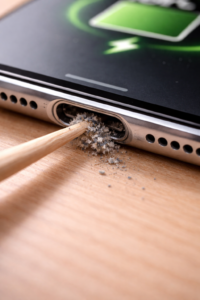
Dust or damage in charging port can:
- Interrupt power supply
- Cause unstable charging
👉 Phone shows charging, but actual power is low.
💡 Even a small amount of lint from your pocket can cause this — it’s more common than you think.
🧠 6. Software Bug or Calibration Issue
Sometimes Android shows wrong battery percentage.
👉 Example:
- Battery is actually charging
- But percentage is stuck
💡 This usually happens after updates or long usage without restart.
⚡ 7. Fast Charging Not Working
If fast charging fails:
- Charging becomes very slow
- Looks like battery is not increasing
💡 Many users don’t realize fast charging has stopped — and assume something is wrong with the battery.
🛠️ Quick Fixes You Should Try First
Now let’s fix it step by step 👇
✅ Fix 1: Change Charger & Cable
- Use original charger
- Try different USB cable
- Avoid local/cheap chargers
👉 This alone fixes the issue in many cases.
💡 Honestly, this is the first thing I recommend — and it solves the problem most of the time.
✅ Fix 2: Stop Using Phone While Charging
- Don’t play games
- Don’t watch videos
👉 Let phone charge peacefully for 20–30 minutes.
💡 If you’ve ever noticed your phone charging faster when left untouched — that’s exactly why.
✅ Fix 3: Check Heating
If phone is hot:
- Remove case
- Keep it in cool place
👉 Charging will improve automatically.
✅ Fix 4: Clean Charging Port
- Use soft brush or toothpick carefully
- Remove dust/lint
⚠️ Don’t use water or metal objects.
💡 I’ve seen phones start charging normally just after cleaning the port — simple but effective.
✅ Fix 5: Restart Your Phone
Simple but effective:
- Clears background processes
- Fixes small bugs
💡 Sounds basic, but it works more often than people expect.
✅ Fix 6: Enable Airplane Mode While Charging
👉 This reduces:
- Network usage
- Battery drain
So charging becomes faster.
✅ Fix 7: Try Charging in Switch-Off Mode
Turn off your phone and charge.
👉 If battery increases normally:
➡️ Problem is software or background usage
💡 This is a quick way to confirm whether it’s a hardware issue or not.
🔧 Advanced Fix (If Problem Still Not Solved)
🔋 Battery Calibration (Simple Method)
Sometimes battery percentage is wrong.
Try this:
- Use phone until 0%
- Charge to 100% without interruption
- Keep charging for extra 30 minutes
- Restart phone
👉 This helps fix battery percentage not updating issue
💡 I usually suggest this only if percentage is clearly stuck or behaving abnormally.
⚠️ When It’s a Hardware Problem (Important)
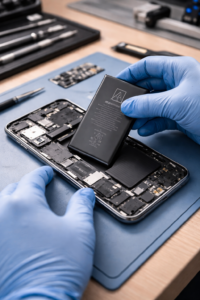 If nothing works, then it’s likely hardware.
Signs of hardware issue:
- Battery stuck at same percentage always
- Phone heats even while idle charging
- Battery drains fast even after full charge
- Charging only works when phone is off
👉 In this case, you may need:
- 🔋 Battery replacement
- 🔌 Charging port repair
💡 At this stage, trying more tricks usually won’t help — better to get it checked.
💡 Pro Tips to Avoid This Problem
- Always use original charger
- Avoid using phone while charging
- Don’t let battery drop to 0% daily
- Keep charging between 20%–80%
- Avoid overcharging overnight regularly
💡 Small habits like these actually increase battery life a lot in the long run.
❓ FAQs (People Also Ask)
❓ Why is my phone stuck on one battery percentage?
This usually happens due to:
- battery calibration issue
- weak charger
- battery health problem
❓ Why is my phone charging but losing battery?
Because:
- apps are using more power than charging
- or charger is too slow
❓ Is it normal if battery stays at 80%?
Yes, some phones have a battery protection feature to stop charging at 80%.
❓ Why does my phone charge only when switched off?
This indicates:
👉 software issue OR weak power supply
❓ How do I know if my battery is damaged?
Signs:
- fast draining
- overheating
- not charging properly
🏁 Final Conclusion
If your phone is charging but battery not increasing, don’t panic.
👉 In most cases, the problem is:
- weak charger
- heating
- background apps
👉 Personally, I’ve seen that people often assume the worst, but simple fixes solve the issue most of the time.
But if issue continues:
➡️ It’s likely a battery or hardware problem
🔗 Related Articles You May Find Helpful
- Why Does My Phone Battery Drain Overnight? (Causes & Fixes)
- Why Is My Phone So Slow All of a Sudden? Easy Fix Guide
- Phone Heating While Charging – Causes and Fixes
- Why Fast Charging Is Not Working on My Phone?